Motf EnableSpeedRegulation
Enables marking speed regulation as a function of MOTF speed.
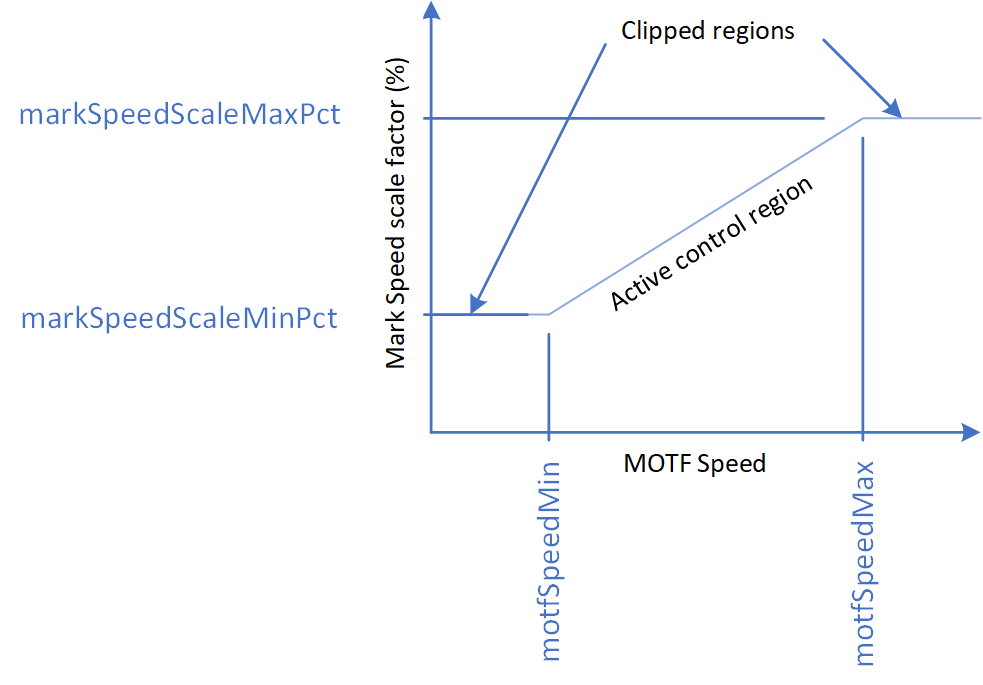
The first two arguments let you specify the range of belt speeds over which a linear scaling of marking speed will take place. If the belt speed is reduced to below motfSpeedMin, then the MarkSpeed will be clamped at markSpeedScaleMinPct, where markSpeedScaleMinPct is a percentage multiplier of the MarkSpeed. If the belt speed exceeds motfSpeedMax then the MarkSpeed will be clamped to markSpeedScaleMaxPct where markSpeedScaleMaxPct is a percentage multiplier of the MarkSpeed.
Over the web speed range between motfSpeedMin and motfSpeedMax, the current set-point marking speed is linearly scaled between markSpeedScaleMinPct and markSpeedScaleMaxPct.
Syntax
| EnableSpeedRegulation( float motfSpeedMin, float motfSpeedMax, float markSpeedScaleMinPct, float markSpeedScaleMaxPct ) |
Parameters
| motfSpeedMin | float | Minimum specified MOTF speed that scaling will be applied. |
| motfSpeedMax | float | Maximum specified MOTF speed that scaling will be applied. |
| markSpeedScaleMinPct | float | Scale factor in % applied to the mark speed set-point when the MOTF speed is at the minimum specified value. |
| markSpeedScaleMaxPct | float | Scale factor in % applied to the mark speed set-point when the MOTF speed is at the maximum specified value. |
-- This sample images a square at equal spacing using Marking Speed Regulation
SetUnits(Units.Millimeters)
-- Use MOTF Port 0
MOTF.Mode = Encoder.ExternalSingleAxis
-- Web direction
MOTF.Direction = Direction.BottomToTop
-- 10um linear resolution for example
encoderLinResInMmPerCount = 0.010
-- Bits/Mm * Mm/Count -> Bits/Count
MOTF.CalFactor = System.CalFactorY * encoderLinResInMmPerCount

-- Initialize the MOTF settings
MOTF.Initialize()

-- Initialize laser/scan-head settings
Laser.MarkSpeed = 5000
Laser.MarkDelay = 200
Laser.JumpSpeed = 10000
Laser.JumpDelay = 200
Laser.Frequency = 20
Laser.DutyCycle1 = 50
Laser.Power = 50
Laser.LaserOnDelay = 75
Laser.LaserOffDelay = 125
Laser.PolyDelay = 50
Laser.VariPolyDelayFlag = true

-- Initialize MarkSpeed Regulation
minWebSpeedInMmPerSec = 0
maxWebSpeedInMmPerSec = 500
speedScaleAtMinWebSpeedInPct = 5
speedScaleAtMaxWebSpeedInPct = 100

MOTF.EnableSpeedRegulation(minWebSpeedInMmPerSec, maxWebSpeedInMmPerSec,
speedScaleAtMinWebSpeedInPct, speedScaleAtMaxWebSpeedInPct)

-- Wait for this web travel before marking
partDistance = 50.

-- Wait for start signal
IO.WaitForIo(Pin.Din.UserIn1,Trigger.Edge.Rising, 0, 0, true)

-- Initialize to wait the initial distance
MOTF.ResetTracking()
System.Flush()
-- Repeat until aborted via external signal
while IO.ReadPin(Pin.Din.UserIn4) == false do
    MOTF.WaitForDistance(partDistance)
    -- Counters are automatically reset when WaitForDistance() releases
    MOTF.StartTracking(Tracking.WhileMarking)
    Image.Box(-10, -10, 20, 20)
    MOTF.StopTrackingAndJump(0, 0, 0, 200)
    Laser.WaitForEnd()
    -- Counters are still counting and distance being measured
    -- The next two lines if uncommented are for diagnostics
    -- webSpeedInBitsPerMsec = IO.ReadPort(Port.Advanced.MOTFFrequency1)
    -- Report("Web speed in mm/sec: " .. (webSpeedInBitsPerMsec * 1000) / System.CalFactorY)
end

Report ("Job Finished")
-- Turn off speed regulation
MOTF.DisableSpeedRegulation()